


Transform Your PDFs: Creating Interactive, Fillable Forms with Ease
As entrepreneurs and creative minds, we often find ourselves in need of efficient solutions for presenting information and collecting data. Today, let’s delve into the world of digital forms. Specifically, we’re going to explore how to convert a standard PDF into a dynamic, fillable form using PDFescape. This tool is perfect for those looking to add a touch of professionalism and interactivity to their documents.
Turning PDF in Fillable Forms Tutorial ↓
Step 1
Once you finish editing your Canva Template forms,/questionnaires / Checklist… download in PDF Standard Format. (You can choose just the Pages you want to download )

Step 2
Open the Website to Convert PDF to Fillable Form Free Visit pdfescape.com. To edit Online, choose the option that says “PDFescape Online PDF Editor”.
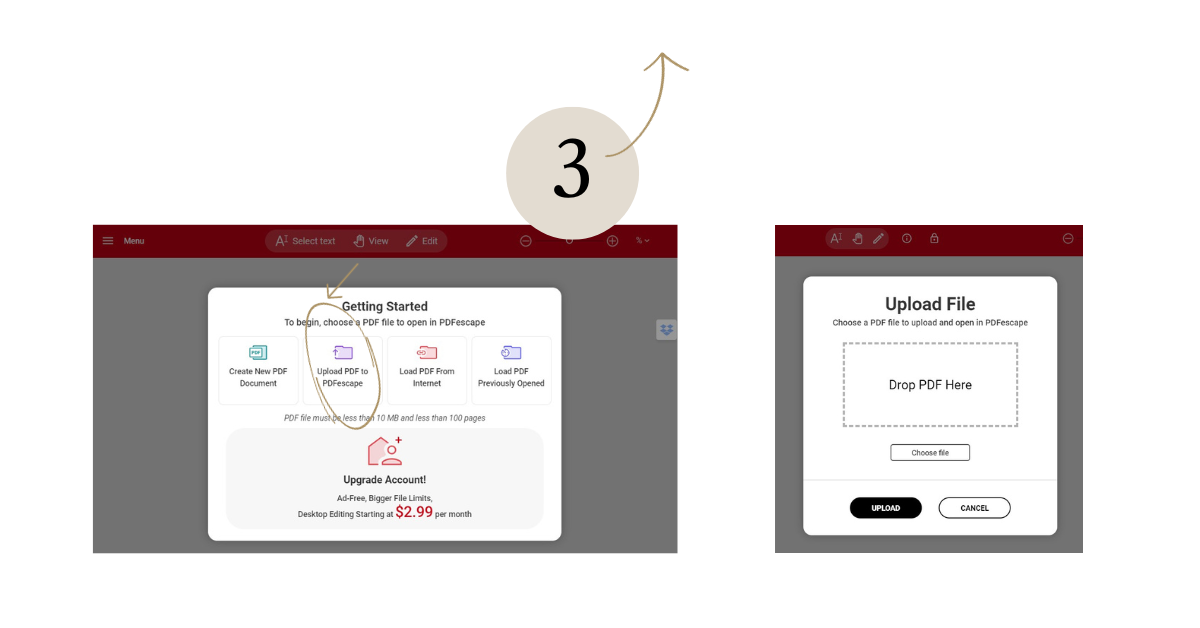
Step 3
Choose to “Upload PDF” on the PDFescape website and upload your Downloaded PDF from Canva there.
Step 4
Click the Page Icon, select “Form Field”, Type Select “Text” and move the mouse to the Form Field and Click to adjust the size and place it.
When finished “click to disable”)

Step 5
Repeat this step, choosing the Form Field Type for each line you are filling in as you complete the form.
Step 6
DONE! Download your Fillable PDF, Rename it if necessary, and send it to your clients. They can now directly type into your Fillable Form, supplying all the details you’ve requested.

Creating a fillable PDF form with PDFescape is not just about convenience; it’s about presenting your brand in a polished, interactive manner that resonates with your clients and colleagues. Whether it’s for surveys, registrations, or client feedback, these customizable forms elevate your professional documents to a new level of engagement and efficiency.
At The Closers Society, we understand the importance of maintaining a sophisticated and professional image in all aspects of your business. Using tools like PDFescape to create fillable PDF forms aligns perfectly with this ethos, ensuring every interaction with your brand is a memorable and seamless experience.
Remember, your documents are more than just paper or digital files – they are an extension of your brand’s story. Make each one count with the power of interactive, fillable forms.
Pro-Tip for Client Onboarding:
While fillable PDFs are a great quick fix, they can sometimes feel clunky for a high-end client experience. If you’re ready to move away from emailing files back and forth, a professional website with integrated forms is the ultimate way to onboard your clients seamlessly.
Ready to ditch the PDFs altogether?
If you’re tired of the DIY tech struggle and want a client experience that reflects your luxury pricing, it might be time for a professional upgrade. Skip the months of building and get a high-conversion Website in a Week. It’s the next level of professional client management, designed specifically for editorial brands who want to work less and convert more.
Not sure if your brand is ready for that jump?
🍒 Download my Editorial Brand Audit Checklist to see exactly where your current process is leaking leads. ↓







share this post